Watercolor Wedding Floral Boho Frames: A Creative Toolkit
If you’re looking to craft beautiful wedding invitations or infuse a touch of bohemian romance into your design projects, watercolor wedding floral boho frames can be a fantastic resource. These digital clip art collections, featuring delicate, painterly floral borders, are designed to give your creations a unique, artistic, and personalized feel. The appeal is broad: whether you're a bride designing your own stationery, a graphic designer creating client branding, or a small business owner making greeting cards, these frames offer a shortcut to a sophisticated aesthetic.
However, jumping in without a clear understanding of how to select and use these assets can lead to frustration, wasted time, and underwhelming final products. The key is to approach them not just as pretty pictures, but as flexible tools that require a bit of know-how to unlock their full potential.
The Common Mistake of Ignoring Resolution and File Format
A major oversight many beginners make is downloading a collection like Watercolor Wedding Floral Boho Frames and immediately using it for all intended purposes without checking the technical specifications. The description states it includes PNG files at 3300 x 3300 px and 2400 x 3300 px. This is crucial information. Using a high-resolution PNG for a social media graphic is excellent, but attempting to print it on a mug or tote bag directly from this digital file might not yield the crisp result you expect.
PNG files are typically ideal for web use and digital projects because they support transparency, allowing you to layer frames over backgrounds cleanly. For physical printing on textiles or ceramics, the process often requires a different file preparation. A common mistake is to assume "you can print this on anything" means the file is ready-to-go for commercial print processes. It usually isn't. The high resolution is a great starting point, but for physical merchandise, you may need to convert or vectorize the design for the specific printer's requirements to avoid blurry or pixelated outcomes.
Practical Advice: Before you commit to a project, match the file format and resolution to your end medium. Use the PNGs for digital invitations, web banners, or logo mock-ups where transparency is needed. For physical prints, consult with your printer or the platform (like a mug-printing service) about their specific file requirements—they might need a vector file, a JPEG with a white background, or a particular resolution density (DPI). Preparing your files correctly from the start saves you from the disappointment of a low-quality print.
Overlooking Licensing and "Text for Display Only"
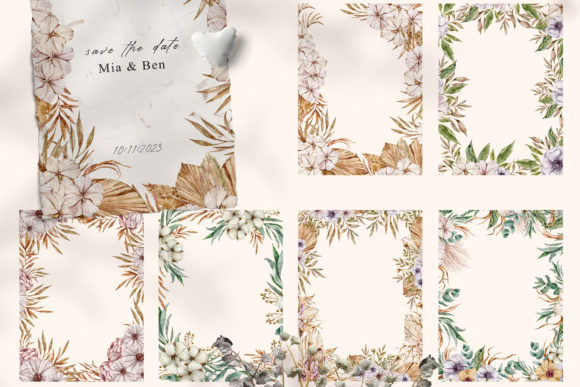
Another area where confusion arises is the licensing and usage terms. The note "Text is for display purposes only and not included" is important. It means any textual elements shown in preview images—like "Save the Date" or names within the frame—are not part of the actual downloadable files. You are receiving only the floral frame artwork. This is standard for clip art, but some purchasers misunderstand and expect editable text templates.
A related, more serious misunderstanding involves the license itself. Many believe purchasing a digital collection grants unlimited commercial rights. While collections like this are often intended for commercial use (invitations, logos, branding), you must verify the specific license. Does it allow you to use the designs on products you sell, like greeting cards or posters? Usually, yes. Does it allow you to resell or redistribute the actual PNG files themselves? Almost certainly no. Using these frames as part of your original created product is fine; selling the raw clip art files is a violation.
Better Approach: Always read the product description or included license file thoroughly before using the assets for any commercial venture. Look for terms like "commercial use allowed," "personal and commercial use," or any restrictions on resale. This protects your business and respects the artist’s work. For adding text, you’ll need to use graphic design software like Canva, Adobe Illustrator, or even PowerPoint to overlay your own custom wording onto the transparent frame area.
Misjudging Color and Style Compatibility
Watercolor floral boho frames have a specific aesthetic: soft, blended colors, organic lines, and a romantic, somewhat rustic vibe. A common error is forcing this style into a project that demands a completely different tone, like a sleek, modern corporate brochure. The mismatch can make your final design feel disjointed and amateurish.
Similarly, the color palette of the watercolor frames may not perfectly align with your wedding or brand colors. While watercolor art often has a translucent, blendable quality, trying to digitally alter its core colors can be challenging and may degrade the artwork's natural look. Simply slapping a blue frame onto a pink-themed invitation without considering harmony can clash.
Constructive Solution: Evaluate your overall design theme first. Bohemian watercolor frames work beautifully with other natural, textured elements—think linen paper backgrounds, handwritten fonts, and earthy accents. For color compatibility, use the frames as a starting point. Select your other design elements (solid colors, photographs, secondary patterns) to complement, not fight with, the frame’s inherent palette. If you need a different color, look for collections that offer multiple color variations, or consider using software to subtly adjust hue and saturation while preserving the watercolor texture, rather than attempting a drastic color replacement.
The Pitfall of Underestimating Design Software Needs
Enthusiasm for a beautiful clip art set can sometimes overlook the practical requirement of having appropriate software to use it effectively. While you can technically open a PNG in many basic programs, to truly customize it—resizing without loss, cropping, combining elements, adding text professionally—you need a capable tool.
Attempting to use these frames in a word processor for invitation layout, for example, often leads to alignment issues, poor image quality when printed, and frustration with text placement. The "transparent" background of a PNG might even appear as a white box in such software.
What to Check Before Starting: Ensure you have access to a design program that handles PNG transparency and layers. Free online platforms like Canva are excellent for beginners and professionals alike and are perfectly suited for this task. More advanced users might use Adobe Creative Suite. Before purchasing the Watercolor Wedding Floral Boho Frames collection, confirm you have a tool that can unlock its versatility. This small step prevents the asset from sitting unused in your downloads folder.
Neglecting Scalability and Composition Variations
A set offering multiple frame sizes (like 3300px and 2400px) is providing flexibility. A mistake is using only one frame for every project, regardless of the canvas size. Using a square 3300px frame for a tall, rectangular poster (say, 2400x3600px) might require awkward cropping that cuts off delicate floral details.
Also, overlooking the compositional potential of the frames is a lost opportunity. They aren't just for bordering an entire page. You can use elements from within a frame as standalone floral accents, cluster smaller frames together for a collage effect on a greeting card, or use a very large frame as a central background element rather than a border.
Realistic Example: For a wedding invitation, choose the frame size that best fits your chosen paper or digital layout. For a social media banner, you might crop a portion of the frame to create a corner accent, leaving most of the space for your text and photos. Think of the frames as modular artistic elements, not rigid templates. Experiment in your design software by duplicating, scaling, and repositioning elements to create unique compositions that feel custom, not cookie-cutter.
Ultimately, Watercolor Wedding Floral Boho Frames are a powerful creative resource when used with intentionality and a bit of technical foresight. By avoiding these common pitfalls—respecting file formats, understanding licenses, matching aesthetics, using proper software, and thinking creatively about composition—you transform a simple download into a versatile tool that elevates your wedding stationery, brand materials, and personal projects. The goal is to let the beautiful, bohemian watercolor art enhance your vision, not complicate it. Start by planning your final output, then work backwards to select and prepare the right frame from your collection for that specific purpose. This mindful approach ensures your designs are as seamless and professional as the artwork itself.